
KAREN SU
3D Environment Artist
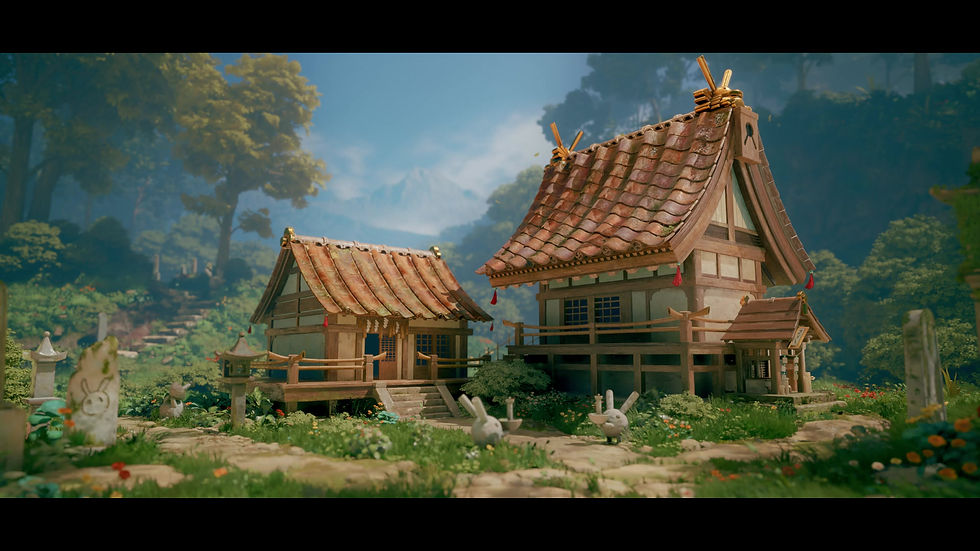
The Japanese Hare Shrine
━
A lonely, but peaceful shrine dedicated to rabbit spirits sits in the middle of a forest clearing, overgrown by the surrounding foliage, and years untended to. Though it looks abandoned at a first glance, curious spirits still reside in the shrine and call it their home, curious whenever a rare traveler pays them a visit.


Original Concept - Nikolai Timofeev
━
The Japanese Hare Shrine is based off of the original concept art of the same name by Nikolai Timofeev on ArtStation. This project holds a special place in my heart as it combines all of the 3D knowledge I have gained at Gnomon and my roots as a 2D artist. This was a challenge for myself to create a foliage-dense scene and really dive into SpeedTree. I was responsible for all aspects of this scene.

Process
━
I started the blockout of the project in Maya first before I took the completed blockout into Unreal Engine 5 to check the proportions and match camera perspective. Most of the structural pieces I purposefully kept simple to keep the polygon count low, so materials were added as the project developed over time.


━
Materials & Decals
The textures for my modkits were created using a combination of tileable textures/trimsheets, edge decals, and a small number of baked reusable pieces. Using this workflow maximized the efficiency of the texture and polygon counts of my scene while likewise giving me the ability to create diverse variations of detail.

To create decals, I repurposed a lot of the materials I had already made, using masks to cut out specific shapes or patterns in them. They were projected onto planes and then scattered throughout the scene to maximize detail variation without being too expensive on the engine.


Instead of sculpting and baking the foliage atlas cards for all of the different greenery in the scene, I wanted to incorporate my 2D background by handpainting the foliage in Procreate, then using 3D sampler to create normal/AO/displacement maps for them. After those were created, I took all of the atlas cards into SpeedTree for procedural modeling. This gave me the opportunity to give the foliage its handcrafted detail.
━
Foliage


Blueprints & PCG
━
I created a mesh scatter blueprint to assist with scattering foliage (like flowers or small bushes) along a designated area. This gave me the opportunity to make an inifinite number of seeds, and from there, several custom parameters, like the size, rotation, or radius of the meshes, could be used to further lookdev the scene.
I also explored using PCG for other aspects of the scene where procedural content generation would be more effective than just a blueprint's construction script.


Two instances of using PCG in the scene were with scattering moss meshes on top of a static mesh (in this case, some of the stone statues). By adding specific actor tags to certain meshes (moss_points), it would make sure that only meshes that have that specific actor tag would have moss meshes scattered on top of them.


The second PCG was a scatter based on the scene's landscape data, and then the scatter area was controlled via a user-inputed texture alpha map. Similarly to the blueprint scattering, this PCG scatter had several parameters to allow myself to have fine-tuned control with the offset of the meshes, the size, rotation, etc., and using a seed parameter allowed inifinite variations to be made. This particular scatter was used for the edges of pathways to blend between stone pathways and dirt.

